Track Ride 365 reports and the Chrome Chapter checklist
H.O.G.’s 2026 Chrome Chapter Recognition Program wants a chapter to meet every criterion, with supporting evidence, by 11:59 p.m. on December 31, 2026. Chapters that qualify get a chrome chapter flag and member patches in early 2027, and the recognition lasts a year. Kickstand gives your officers three places to follow along: a tile on Members, a chart, and a checklist.
Everything here is marked Unofficial. It is your chapter’s own tracking. Kickstand can’t see H-D’s Ride 365 system, where the real mileage readings live, and H.O.G. decides what counts. For the official count, check Manage My Chapter on the H.O.G. site.
See where your chapter stands
Section titled “See where your chapter stands”- Open the menu (three lines, top right) and tap Chapter console. On a computer, click Members in the sidebar.
- At the top, the card Ride 365 mileage reports, 2026 shows a bar and a line like “4 of 14 members (29%) have made a 2nd report; 8 (57%) have made at least one.” It also names the goal: at least half of your members, rounded up, with two readings in the year.
- The badge on the card reads Over the half line once you’re there. Until then it counts down, such as “3 more reports to reach half”.

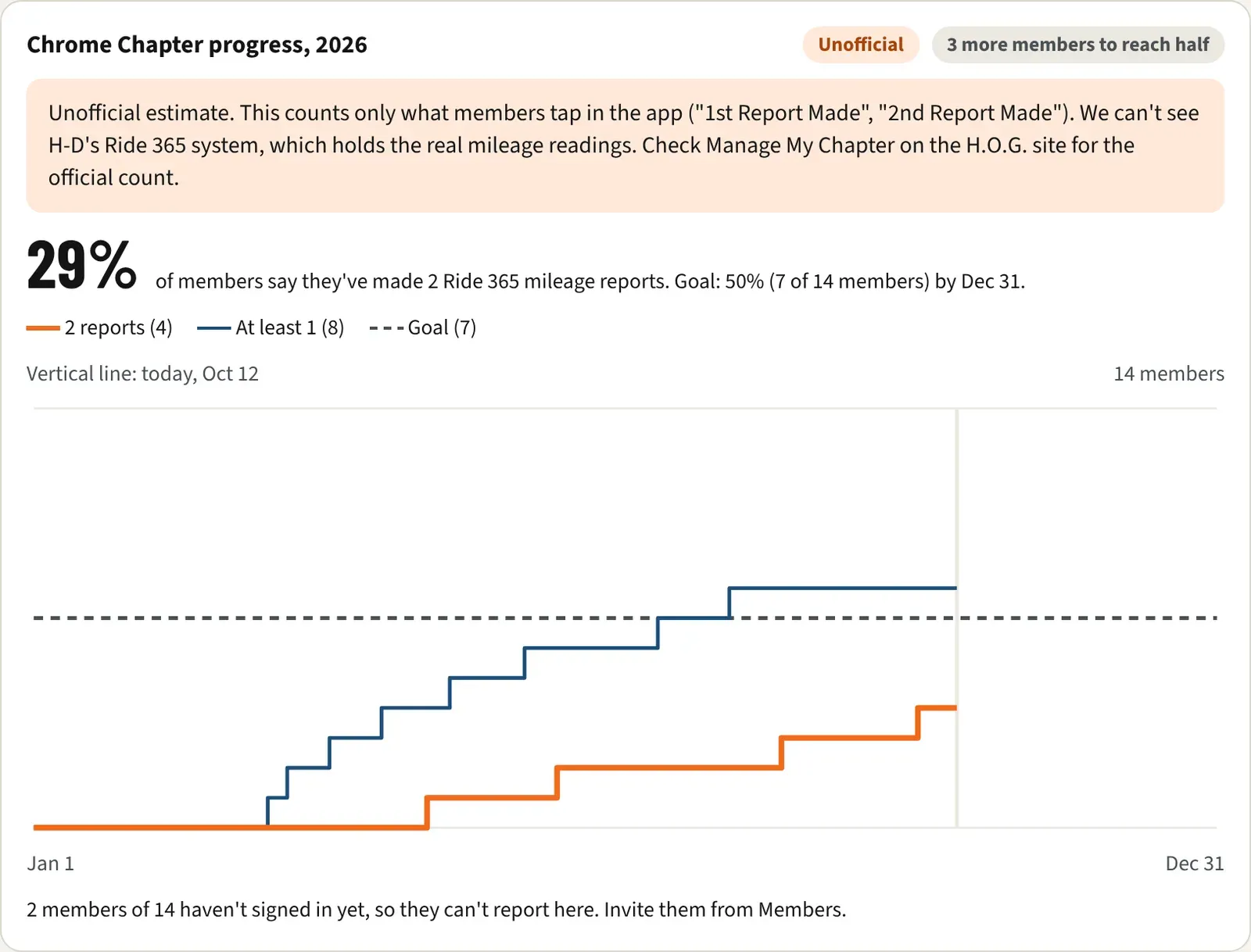
- Click Challenges in the sidebar. Above your challenge list, Chrome Chapter progress, 2026 shows the same numbers as a chart.
Reading the chart
Section titled “Reading the chart”- The big number is the share of members who say they’ve made two Ride 365 mileage reports, next to the goal: “Goal: 50% (7 of 14 members) by Dec 31.”
- The orange line is 2 reports, the blue line is At least 1, and the dashed line is Goal. A vertical line marks today. The bottom axis runs from Jan 1 to Dec 31.
- The badge up top reads Over the half line or something like “3 more members to reach half”.
- A warning box repeats that the chart is an unofficial estimate. It counts only what members tap in the app (“1st Report Made”, “2nd Report Made”).
- If some members have never signed in, a line says so, for example “2 members of 14 haven’t signed in yet, so they can’t report here. Invite them from Members.” See Invite members to your chapter.
- The chart shows counts and dates only. It has no names.
- The tile and the chart count the chapter’s active members. Neither shows if the chapter has no members yet.
Riders make these reports from a reminder on Home. See Report your mileage for Ride 365.
Follow the Chrome Chapter checklist
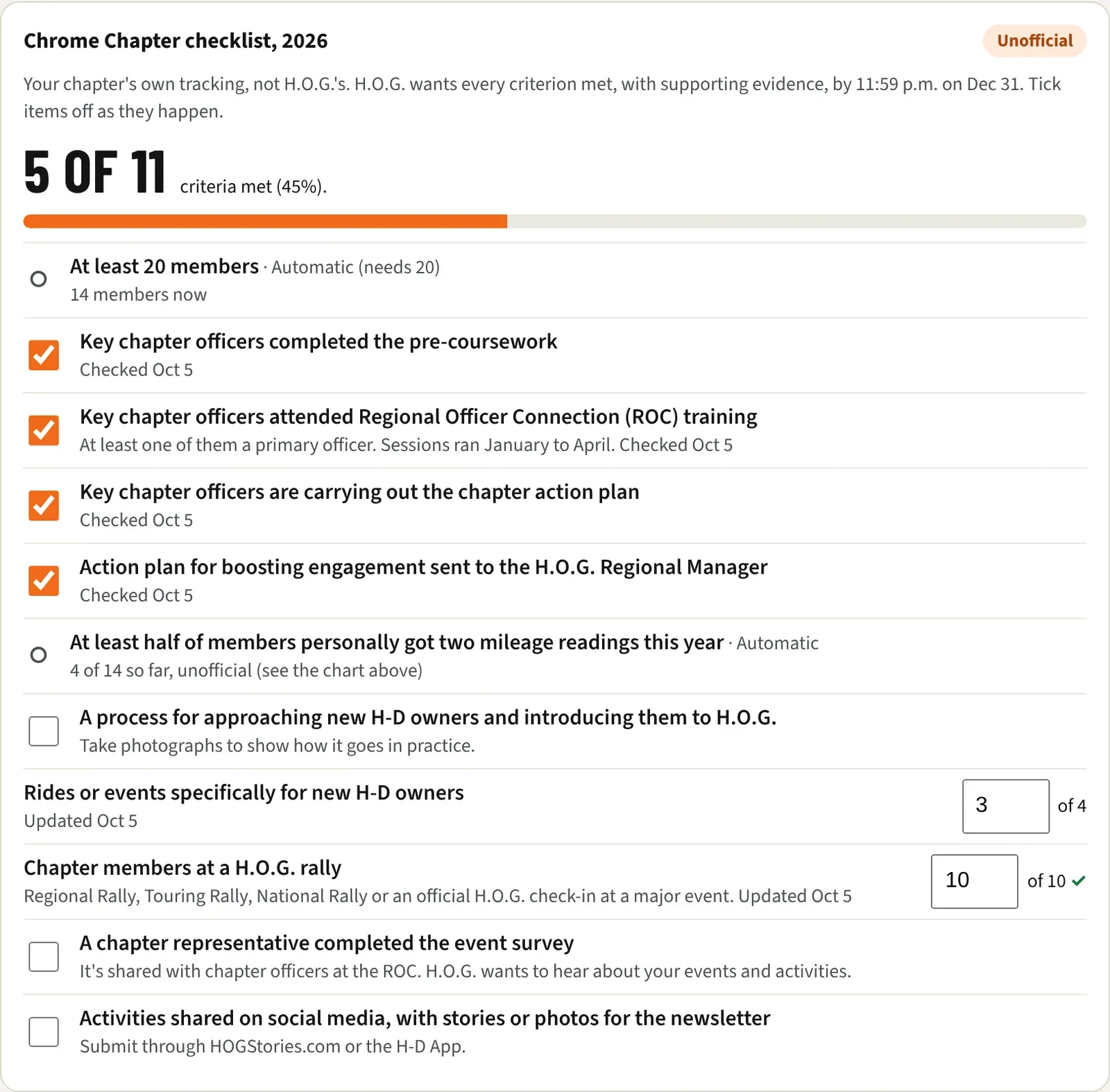
Section titled “Follow the Chrome Chapter checklist”Under the chart, Chrome Chapter checklist, 2026 lists every criterion. At the top is a tally such as “5 of 11 criteria met (45%)” with a progress bar. The checklist is per chapter and per calendar year, so it starts blank each January.
The two criteria Kickstand works out itself
Section titled “The two criteria Kickstand works out itself”These are marked Automatic. You can’t tick them.
- At least 20 members (needs 20). It is met when the chapter has 20 or more active members, and shows “14 members now”.
- At least half of members personally got two mileage readings this year. It is met when the self-reported count reaches half, and shows “4 of 14 so far, unofficial (see the chart above)”.
The criteria you tick off
Section titled “The criteria you tick off”These follow the program booklet’s checklist, in its order, with the booklet’s rule under each one.
- Key chapter officers completed the pre-coursework
- Key chapter officers attended Regional Officer Connection (ROC) training. “At least one of them a primary officer. Sessions ran January to April.”
- Key chapter officers are carrying out the chapter action plan
- Action plan for boosting engagement sent to the H.O.G. Regional Manager. It shows “Due Jun 30” until it’s ticked, then “Was due Jun 30” if the date has passed.
- A process for approaching new H-D owners and introducing them to H.O.G.. “Take photographs to show how it goes in practice.”
- Rides or events specifically for new H-D owners. A count, met at 4.
- Chapter members at a H.O.G. rally. A count, met at 10. “Regional Rally, Touring Rally, National Rally or an official H.O.G. check-in at a major event.”
- A chapter representative completed the event survey. “It’s shared with chapter officers at the ROC. H.O.G. wants to hear about your events and activities.”
- Activities shared on social media, with stories or photos for the newsletter. “Submit through HOGStories.com or the H-D App.”
Tick off a criterion
Section titled “Tick off a criterion”You need a primary board seat for this (see the next section).
- Open Chapter console, then Challenges, and scroll to Chrome Chapter checklist, 2026.
- For a yes-or-no criterion, tick the box next to it. It saves at once, and a line like “Checked Oct 12” appears under it.
- For Rides or events specifically for new H-D owners or Chapter members at a H.O.G. rally, type the number in the box. Click away or press Enter to save. The box then shows “of 4” or “of 10”, with a check mark once you reach the target, and “Updated Oct 12” appears under it.
- To undo, untick the box or change the number.
If a save fails, the tick goes back and the page says “That didn’t save. Try again.”
The checklist only records that something is done. It doesn’t store evidence, and it has no note or date field. The booklet says to submit evidence of your progress where applicable and to keep in touch with your dealership. If you’re unsure, contact your H.O.G. Regional Manager.
Who can do what
Section titled “Who can do what”| Director, Assistant Director, Secretary, Treasurer | Other officers | Platform admins | |
|---|---|---|---|
| See the tile, chart, and checklist | Yes | Yes | Yes |
| Tick items and set counts | Yes | No | Yes |
- Ticking is decided by your board position, not by being a chapter admin. Elsewhere in Kickstand, positions are only titles. This is the exception.
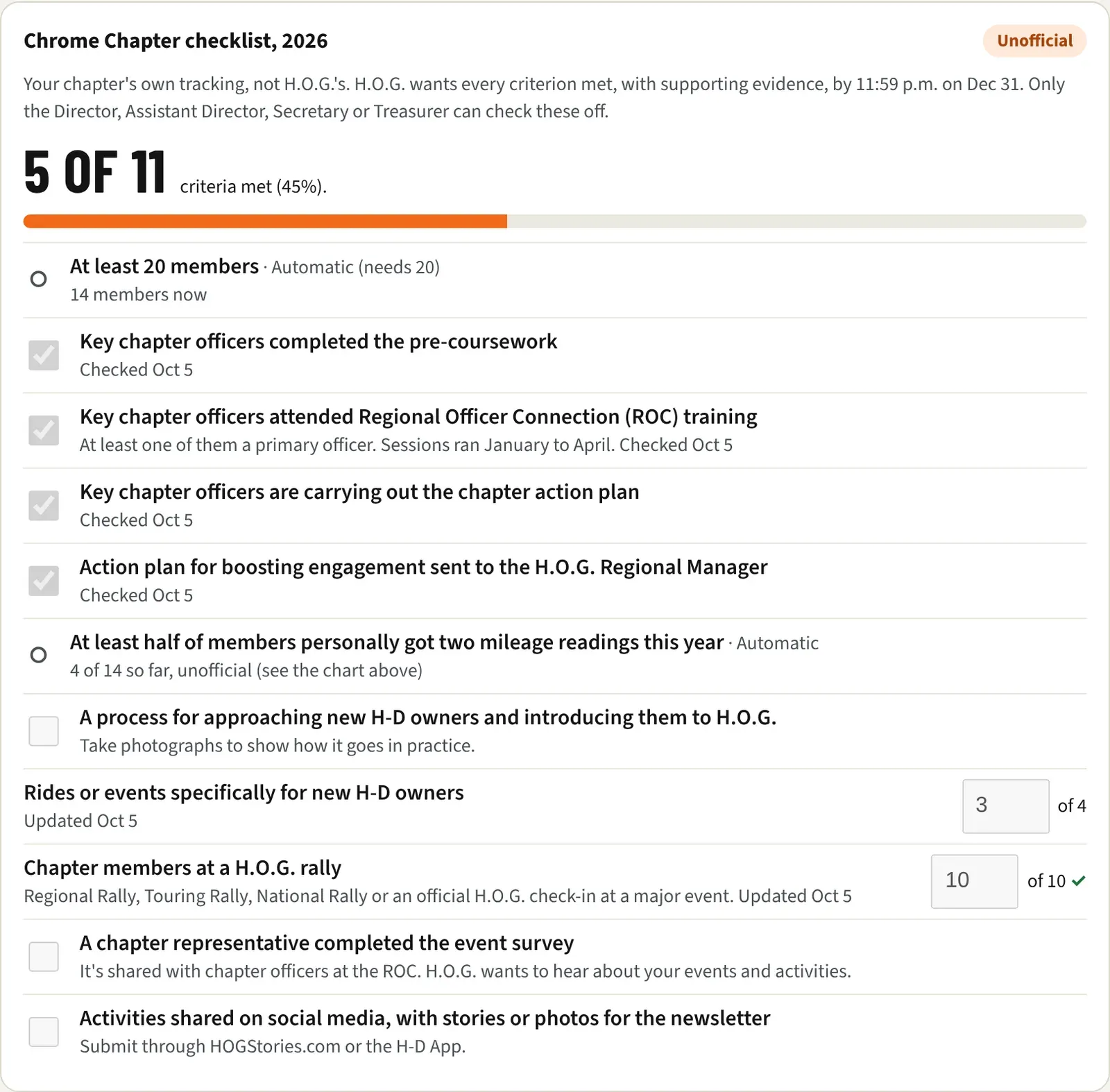
- Other officers see the boxes greyed out, with the note “Only the Director, Assistant Director, Secretary or Treasurer can check these off.”
- Dealers with view access can see everything and change nothing.
- Your position comes from the Current board on the Officers page. See Officers, positions and election changeovers. Secretary counts as a primary seat.
Every change is recorded
Section titled “Every change is recorded”Each tick, untick, and count change is saved to the audit log with who made it, the item, and what it changed from and to. The “Checked” and “Updated” date under an item is the day of its last change, in your chapter’s time zone.
Good to know
Section titled “Good to know”- The mileage criterion is only as good as members’ taps. Members who haven’t signed in can’t report, so invite them from Members. See Manage a member.
- To reach the console and the rest of its sections, see A tour of the Chapter console.