Your emergency contact and privacy
An emergency contact is optional, but please add one so your chapter can reach someone if something happens on a ride. Nothing in the app is blocked without one, so the app simply keeps reminding you until it’s on file. Only chapter officers can look it up, and the app records every lookup.
- Open your profile, or tap Add it now on the reminder on Home. If Home says “2 things to finish your profile,” tap that.
- Find the Emergency contact card. Fill in Name, Relationship, and Phone. Leave This is a cell phone (we can text it) ticked if it’s a cell, so an officer can text when a call doesn’t get through.
- Add a Backup phone (optional) and Notes (optional) if you like, such as “call the cell first.” If the backup is a cell, tick the box that appears under it.
- Tap Save emergency contact. You’ll see “Saved. Only your chapter’s officers can see it.”
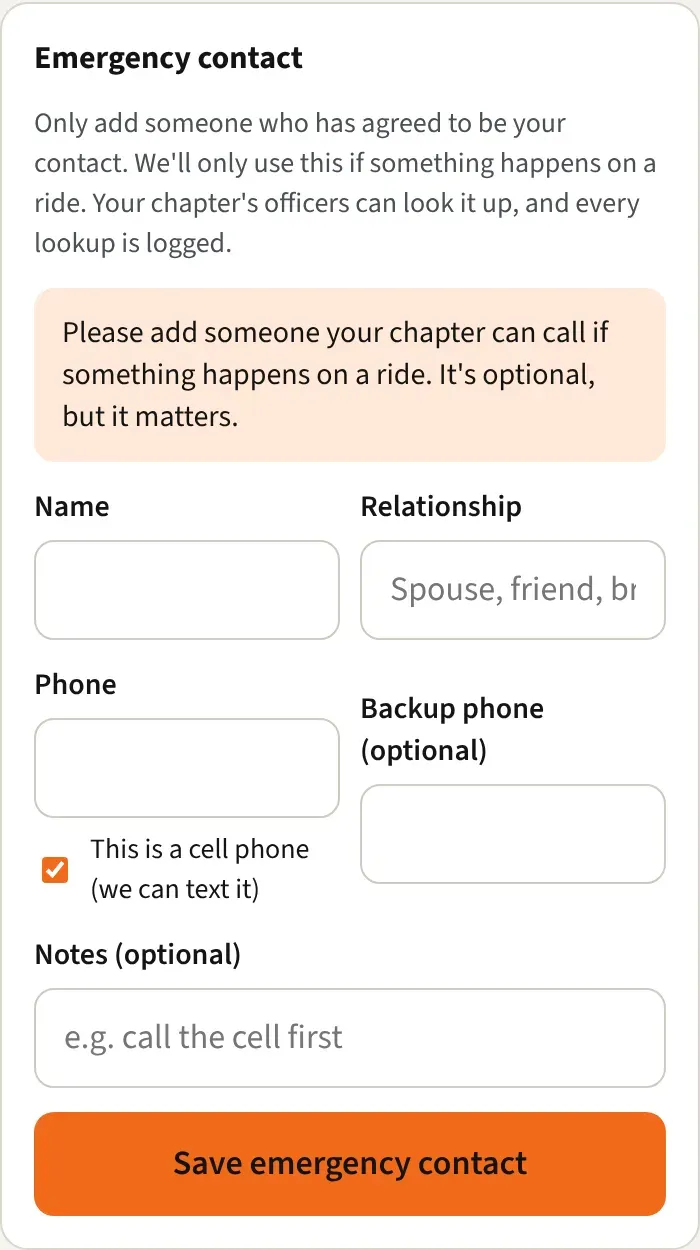
You can also add the main contact during the welcome steps the first time you sign in. See Accept the terms and finish the welcome steps.
Who can see it
Section titled “Who can see it”- You, in your profile.
- Officers of a chapter you belong to, and only through the lookup on a member’s page.
- Other riders can’t see it.
- Each time an officer looks it up, the app records who looked, when, and for which chapter. It doesn’t ask for a reason, so that nobody has to stop and type one in an emergency. You don’t see that record yourself.
Good to know
Section titled “Good to know”- The card says to add only someone who has agreed to be your contact. The app uses it only if something happens on a ride.
- Name and Relationship each need at least 2 characters. Phone numbers need the area code, like (312) 555-0100.
- The contact’s phone can’t be the same number you saved as your own.
- The backup phone has to be different from the main one.
- Change it any time. Saving replaces the old one.
- Your own phone number is a separate setting. Under About you in your profile, Who sees your phone lets you pick Only me, Chapter officers, or Chapter members. See Your profile and settings.
Your name on event RSVP lists
Section titled “Your name on event RSVP lists”When you answer Going or Maybe on a chapter event, you choose how other members see you: your full name, your initials (like S. S.), or nothing (you’re counted, with no name). Your chapter sets what riders start on, and your own choice always wins. Chapter officers always see who answered, and RSVPs are never shown to the public. Change it in your profile under On event RSVP lists, show me as. See The chapter calendar.